CSV import and export
The mechanism is native Filament 5: ImportAction, ExportAction, the jobs, the batch and the completion notification with a download button. The imports, exports and failed_import_rows tables are already migrated, and the kit writes no wrapper at all around any of it. What it adds are two base classes, a dedicated permission for each side, and the decision — resource by resource — to turn them on or not.
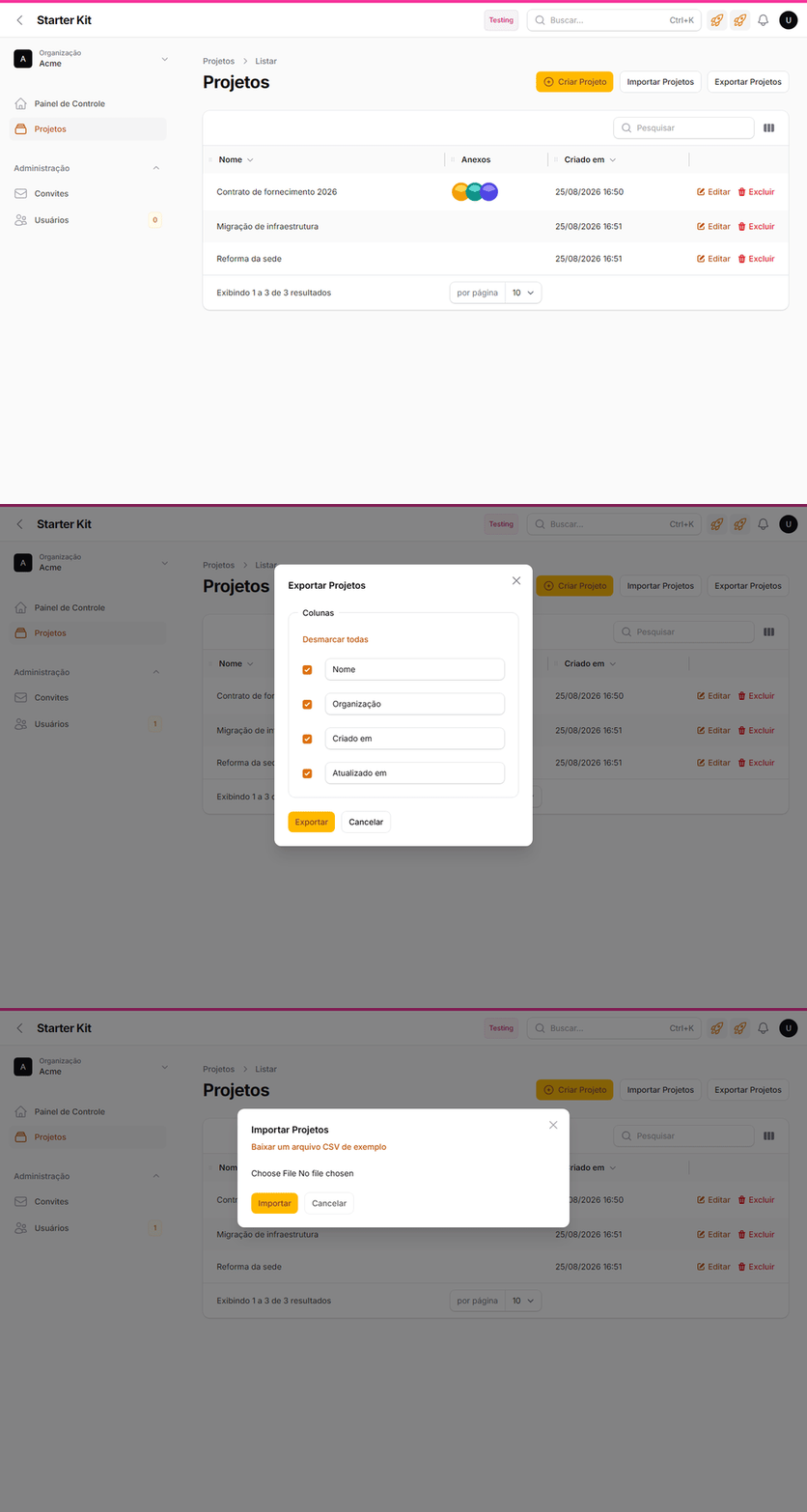
Both buttons live in the listing header, next to “New”: no new screen, no route of their own — what changes from resource to resource is only the permission each one requires.
ImportadorDoKit: the organization boundary the package does not ship
Importer::resolveRecord() runs inside the worker. There is no panel and no route in the session there, so Filament::getTenant() returns null and the BelongsToTenant global scope becomes a no-op — ImportCsv restores auth()->setUser(), the user, and nothing restores the tenant. Two consequences, both silent:
| CSV row | Without App\Support\ImportExport\ImportadorDoKit |
|---|---|
| with a key from another organization | UPDATE on someone else’s record, no 403 and no log |
| new | born with a null tenant_id — invisible to everybody, including whoever imported it |
The fix has two ends. The Action captures the tenant in the request, where it exists (->options(['tenant_id' => Filament::getTenant()?->getKey()])), and the base class uses it on both ends: it scopes record resolution and it fills creation, standing in for the creating hook that has no context down there.
And it fails closed: tenancy on + a model using BelongsToTenant + no tenant_id in the options = the row is refused with RowImportFailedException (it lands in failed_import_rows and comes out in the notification’s failure CSV) and the reason is logged. Carrying on unscoped would be exactly the defect the class exists to close.
ExportadorDoKit: formula injection neutralized on every column
preventFormulaInjection() exists in Filament per column, and it is born off. A cell starting with =, +, - or @ becomes a formula when someone opens the CSV in Excel — and the data that filled it came from a user form. App\Support\ImportExport\ExportadorDoKit applies the neutralization to every column the subclass declares; that is why the subclass declares colunas(), not getColumns().
Export has not a single line of tenant code, and that is the part worth understanding. Its query comes from the screen’s table (getTableQueryForExport()), built in the request, where the global scope has already applied where tenant_id = X; it is serialized with that where inside, and that is what the job runs. Export isolation is inherited; import isolation is built — the exact inverse. The full reasoning is in wikis/arquitetura.md (pt-BR).
Both modals are Filament’s own — the kit draws no screen here:
| Import | Export |
|---|---|
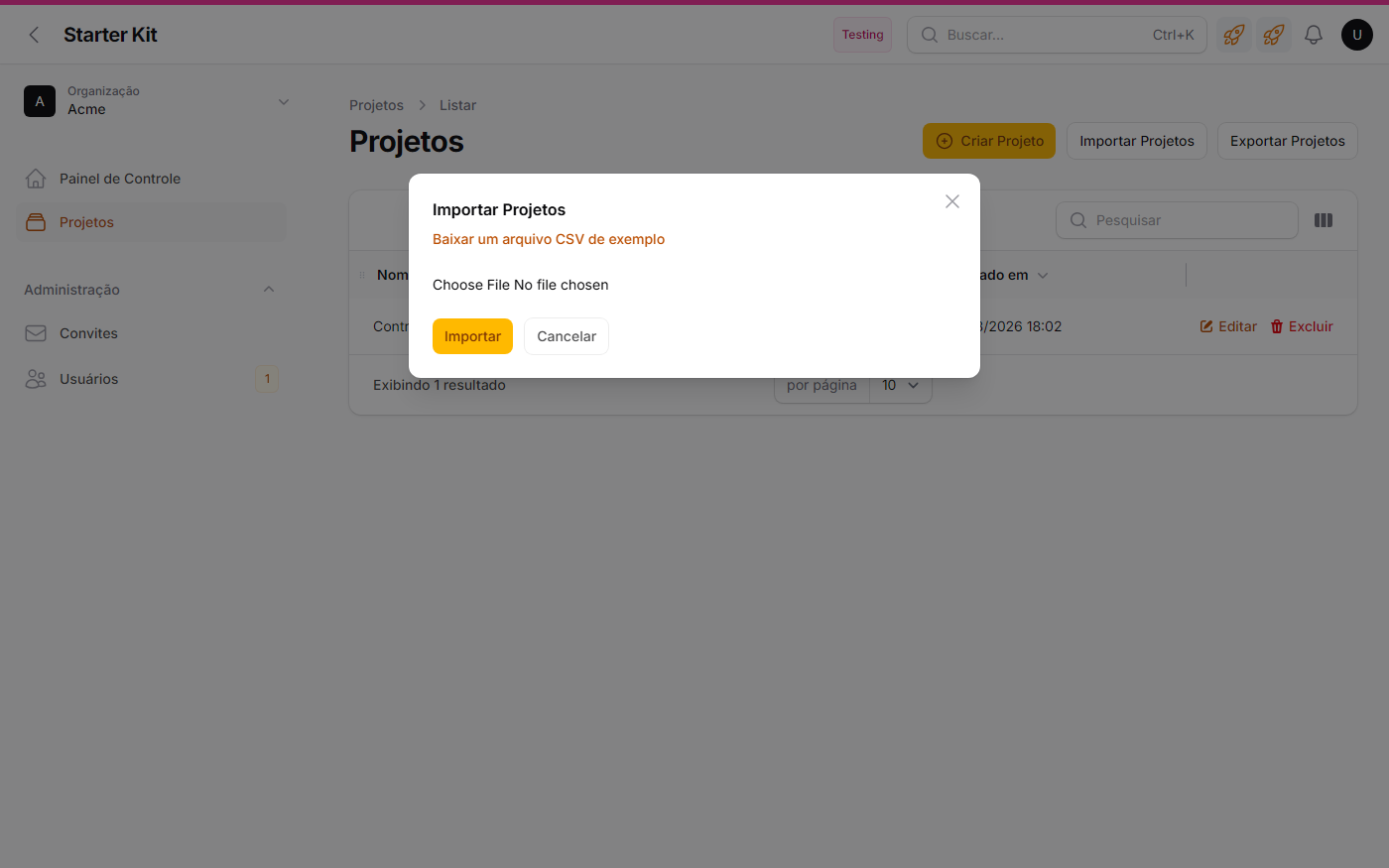 | 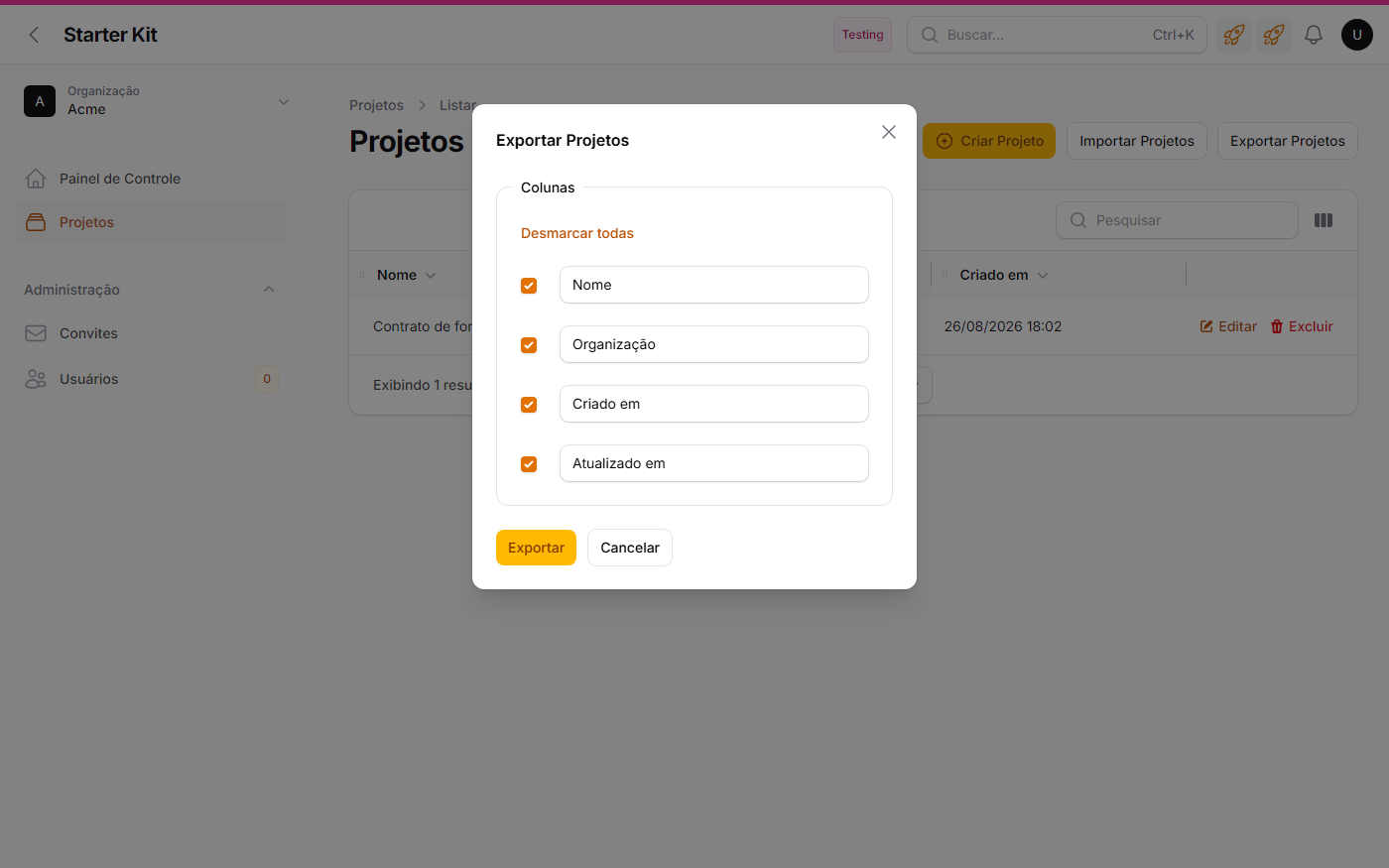 |
Download an example CSV file builds the header from the importer’s columns — that is where you can see, in practice, that tenant is not among them | One field per column declared in colunas(), each with a checkbox and an editable label: whoever exports picks the slice and renames the header, but cannot add a column the exporter never declared |
A dedicated permission, and it is not optional
import and export are the kit’s addition to Shield’s 12 default methods, in config/filament-shield.php → policies.methods — and in single_parameter_methods too, because neither of them receives a record (outside that list Shield would generate import(User $user, Model $record) in the policy, and the Action, which calls Gate::authorize('import') with no record, would throw ArgumentCountError). They generate Import:{Model} and Export:{Model} for every resource.
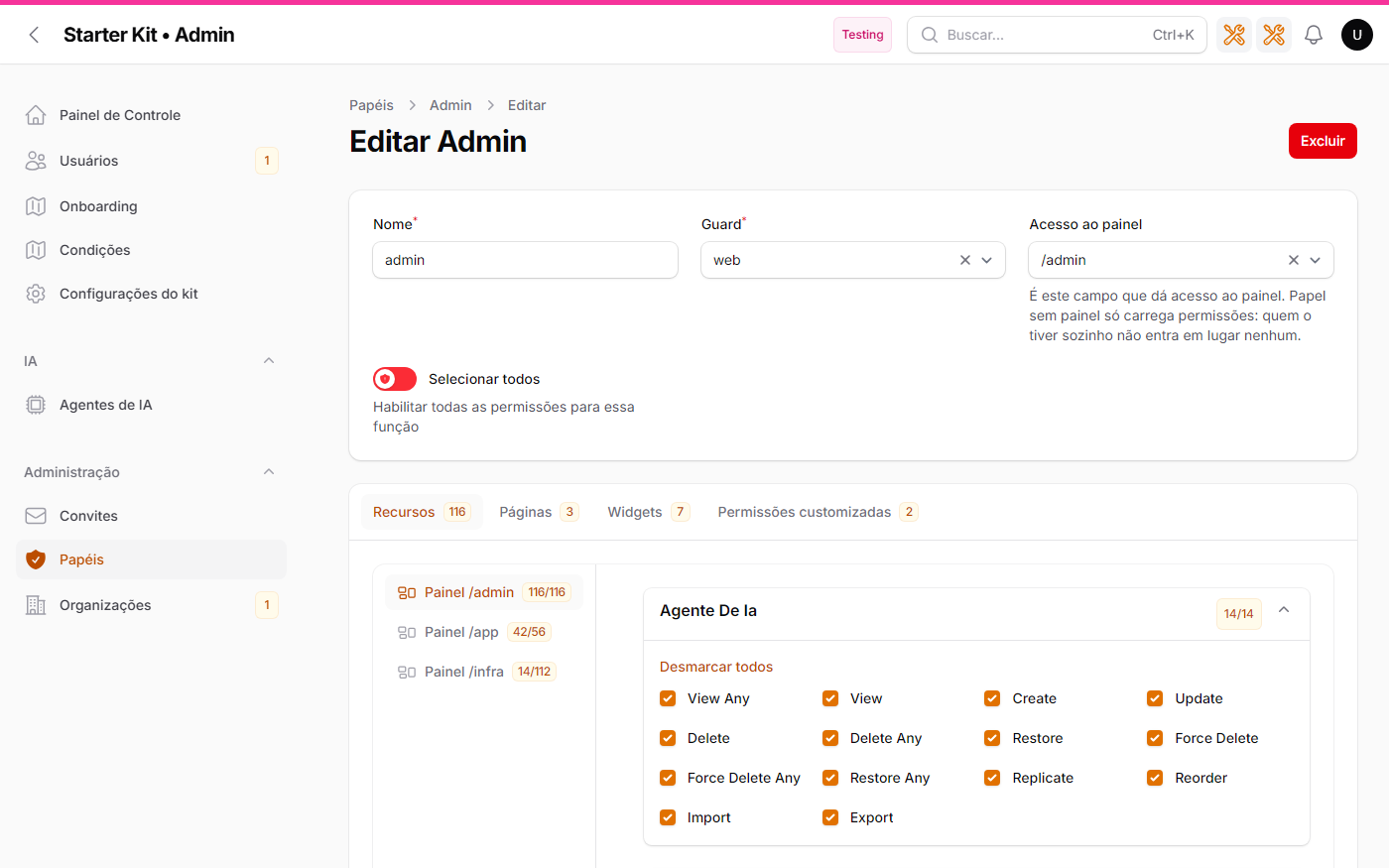
On the roles screen, Import and Export sit right next to View Any, Create and Delete — for every resource, including the ones that never turned the Actions on. That is what lets you grant or revoke each side per role, in /admin → Roles, without touching code.
They are necessary because a Filament Action does not check policies on its own — the vendor says so in Actions/Concerns/CanBeAuthorized.php: the default authorization is null, i.e. allowed. That is why every Action in the kit carries an explicit ->authorize('import') or ->authorize('export'). Without that line, whoever can open the listing takes the whole listing away.
⚠️ Changed that config? Reseed. The new permission does not exist in the database until
shield:generateruns again, and the symptom is the Action disappearing from the screen with no error at all:php artisan db:seed --class=Database\Seeders\ShieldPermissionsSeeder php artisan db:seed --class=Database\Seeders\PapeisSeeder
panel_user is born with neither of them
The subtraction lives in PapeisSeeder::ehPermissaoDeImportOuExport(), and it matches by action prefix (Import: / Export:), not by a list of FQCNs — on purpose: a new resource is born with both outside the ordinary user without anyone having to remember to add it to any list. The criterion is what each one actually is: import is a mass write; export takes the organization’s data out of the application in a file. Whoever uses the business does that one record at a time; whoever moves spreadsheets is whoever operates the organization. admin_app keeps both, because it receives the panel’s whole matrix — and granting it to panel_user is one click in /admin → Roles, if that fits your case.
Who has what today
| Panel | Resource | Import | Export | Why |
|---|---|---|---|---|
/app | Projeto | ✅ | ✅ | the demo resource — it is the reference example for both |
/admin | AgenteIa | ✅ | ✅ | configuration, no personal data |
/admin | Tenant | — | ✅ | creating an organization from a CSV would skip provisioning: per-tenant roles, the first administrator, the visual identity. One spreadsheet row would become an organization nobody can reach |
/admin, /app | User | — | 💤 commented out | the spreadsheet leaves with the e-mail of everybody who has access; and import would bypass invitation, e-mail verification and role assignment — the three pillars of access in the kit |
/admin, /app | Convite | — | 💤 commented out | the invitee’s e-mail |
/admin | Role | — | — | a role is a code identifier, not spreadsheet data |
/infra | AiRun | — | ✅ | a cost ledger; the question it answers is “how much did we spend” |
Commented out means the two lines are already in the Page file, commented, with the warning of what turning them on exposes — the exporter is there, ready; it is one line to uncomment. The decision is born written down, not forgotten: it is the convention .ai/rules/filament.md demands of every new resource, because silent absence is not a decision — nobody goes back to reconsider what was never written.
The columns that are missing on purpose
Filament’s generator infers columns from the database, and the kit strips three of them by hand. Do not put them back:
| Class | Missing column | What it would hand over |
|---|---|---|
ConviteExporter | token, token_lembrete | Convite::aceitar() validates the token and binds the user to the organization with the invite’s role: a CSV with that column is a spreadsheet of entry keys |
AiRunExporter | request, response | the full prompt and answer, from any organization — and /infra has no tenant in the route |
ProjetoImporter | tenant | the generator creates ImportColumn::make('tenant')->relationship() for every FK; accepting it would let the CSV pick the destination organization and make the ImportadorDoKit boundary decorative |
The generator puts all of them back on --force. What guards the absence are the tests in tests/Kit/ImportExportTest.php.
No worker, nothing happens
Filament’s import and export are jobs. The kit is born with QUEUE_CONNECTION=database in .env; composer dev already starts a worker, and in production the worker service of docker compose is what processes them. With the queue stopped, the file is accepted, the row lands in imports/exports and the completion notification never arrives — a stopped queue shows up in the Jobs Monitor in /infra.
Tracking: no new table
imports and exports already record who asked, which importer, how many rows and when it finished. What is not there is exactly what a leak audit asks — which organization the file came from — because both tables belong to the package and have no tenant_id. That is what KitServiceProvider::configureRastroDeImportExport() adds, on the tenancy channel: the subject is organization crossing.
The two sides use different hooks because the package is asymmetric: import has real events (ImportStarted / ImportCompleted), export has none at all, so the hook is the Export model itself — created marks the request and the freshly filled completed_at marks the completion.
Retention: 30 days, and the export pruning deletes the file
| Key | .env | Default |
|---|---|---|
kit.retencao.importacoes_em_dias | KIT_RETENCAO_IMPORTACOES_DIAS | 30 |
kit.retencao.exportacoes_em_dias | KIT_RETENCAO_EXPORTACOES_DIAS | 30 |
30, and not the 14 of the exception and mail trails: the history of a mass write is what answers “who wrote this last week”, and that question usually arrives after month-end closing. failed_import_rows falls by cascade; the export pruning deletes the FILE, not just the row — without that the disk grows forever with CSVs nobody can download any more, because the download link is signed and the row that authorized it is gone.
Both schedules live in routes/console.php (02:20 and 02:30), as Schedule::call and not as model:prune: Filament’s Import and Export models use the Prunable trait but never declare prunable(), so the command would throw LogicException — and there is no way to add the method without editing vendor/. It is the same pattern already used by the mail-trail pruning. Zero or negative turns that pruning off, and the scheduler is what executes it: with no php artisan schedule:work (or the compose scheduler service) the number in the config is just intent.
Turning it on for a new resource
php artisan make:filament-importer Produto -G
php artisan make:filament-exporter Produto -G
Swap the generated extends Importer / extends Exporter for the kit’s base classes (in the exporter, rename getColumns() to protected static function colunas()), delete the tenant column from the importer, and add the Actions to the listing Page’s getHeaderActions():
ImportAction::make()
    ->importer(ProdutoImporter::class)
    ->authorize('import')
    ->options(fn (): array => ['tenant_id' => Filament::getTenant()?->getKey()]),

ExportAction::make()
    ->exporter(ProdutoExporter::class)
    ->authorize('export'),
Then reseed both seeders (ShieldPermissionsSeeder, then PapeisSeeder) and make sure a worker is up. The full recipe, including what to do when the decision is not to turn it on, is in wikis/receitas.md (pt-BR).