Social login: four providers (opt-in, one at a time)
A second way in, next to the password: the Sign in with… buttons below the login form on all three panels. Each provider ships turned off, is turned on individually, and once on does exactly one thing — authenticate someone who already has an account.
| Provider | Socialite driver | Redirect URI | How the kit confirms the e-mail is verified |
|---|---|---|---|
google | /auth/google/callback | email_verified field in the payload | |
| GitHub | github | /auth/github/callback | Socialite already hands over only the primary + verified address, or nothing — presence is the proof |
linkedin-openid | /auth/linkedin-openid/callback | email_verified from the OpenID userinfo | |
| X (formerly Twitter) | x | /auth/x/callback | X only ever returns confirmed_email — presence is the proof |
Facebook and Discord were left out, and not by oversight. See Facebook and Discord: why they are not here for what it would take to include them.
What social login does, and what it deliberately does not
True for all four providers, without exception:
| Authenticates an existing account matching the e-mail the provider returns | ✅ always, when enabled |
| Creates an account for someone who has none | ❌ only with open registration on, which ships off |
| Accepts an unverified e-mail from the provider | ❌ never — it refuses and records the reason |
| Bypasses two-factor | ❌ never — a confirmed-2FA account still hits the challenge |
Stores the access token or refresh_token | ❌ nothing is stored |
Stores the identity at the provider (sub) | ✅ in vinculos_sociais — that is how the account is recognised from the second time on (details) |
Adds a new column to users | ✅ one, origem — it only says which door the account came through (google, github, convite, registro, interno), shown on the users list and the dashboard. Not a link: no provider id, no token; the link is still the verified e-mail |
| Marks a created account as e-mail verified | ✅ yes — the provider already proved it, and asking again would be the same proof twice |
The second row is the important one, and it is not timidity: the invitation is the kit’s only front door. The callback example in the Laravel Socialite documentation is User::updateOrCreate() — copied here, it would turn anyone with an account on any of the providers into a user of your system, bypassing the invitation, the verification and the role assignment. That is an authorization hole, not a convenience. If you do want sign-up through social login, turn open registration on: the kit then creates the account and takes the person to their own profile screen to fill in what is missing.
And remember the rest of the kit: an account with no role opens no panel (User::canAccessPanel()). Someone arriving through social login needs a role like everybody else — the account created by open registration gets its single role, through the same door as the form.
The account the provider creates has no password the person knows (it is born with a random one), and three things ask for the current password: changing it, turning on 2FA and unlocking the session. That is why the profile (/app/meu-perfil, and the other two panels’) has the Set a password by e-mail block: it sends the same link as “Forgot your password?”, ends the session — the page that sets the password only opens for someone logged out — and, once the password is set, all three work. Measured on a real install: it was the first stumble for whoever came in through Google. And whoever chooses to live without a local password is not stuck at the session lock screen: it offers the same buttons as the login, and coming back from the provider unlocks it.
Turning a provider on, in four steps
The steps are the same for all four; only the place where you create the OAuth app changes. You can do everything through .env or through /admin/configuracoes-do-kit → the Login tab — but know who is in charge: the database wins over .env at runtime, and .env only seeds it (see Who wins: the database or .env?). Step 3 is where that matters.
1. Create the OAuth app at the provider and register the redirect URI — your APP_URL plus the path from the table above:
| Provider | Where to create it | What to ask for there |
|---|---|---|
| console.cloud.google.com → APIs & Services → Credentials → OAuth client ID, type Web application | nothing beyond the defaults | |
| GitHub | github.com/settings/developers → OAuth Apps → New OAuth App | nothing to tick; the kit requests the user:email scope in code, and that scope is what makes verification confirmable |
| linkedin.com/developers → Create app → Products tab | enable the Sign In with LinkedIn using OpenID Connect product. Without it the provider does not return email_verified, and the kit refuses every login | |
| X | developer.x.com → Projects & Apps → User authentication settings | type Web App, OAuth 2.0, and the users.read and users.email scopes |
An example URI to register:
https://your-domain.com/auth/github/callback
http://localhost:8000/auth/github/callback     # for development
That path is not a choice: it lives in config/services.php as a relative path, on purpose, so it follows the APP_URL of each environment without one more variable to forget.
2. Write the provider’s three keys into .env:
# Google
KIT_SOCIALITE_GOOGLE=true
GOOGLE_CLIENT_ID=1234567890-abc.apps.googleusercontent.com
GOOGLE_CLIENT_SECRET=GOCSPX-your-secret

# GitHub
KIT_SOCIALITE_GITHUB=true
GITHUB_CLIENT_ID=Iv1.abc123
GITHUB_CLIENT_SECRET=your-secret

# LinkedIn (linkedin-openid driver)
KIT_SOCIALITE_LINKEDIN=true
LINKEDIN_CLIENT_ID=86abc123
LINKEDIN_CLIENT_SECRET=your-secret

# X (formerly Twitter)
KIT_SOCIALITE_X=true
X_CLIENT_ID=your-client-id
X_CLIENT_SECRET=your-secret
3. Get the keys into the database. On a fresh install migrate does it by itself — the settings migration seeds every property from config(), which comes from .env. On a kit that is already installed, .env alone turns nothing on, and config:clear does not change that: the settings table already has the row (false, empty credential) and it wins on every request. Two ways out: save through /admin/configuracoes-do-kit → Login, or run php artisan kit:install --force with .env already filled in — which recreates the database (DELETES the data; harmless only in the minute after installing). Measured on a real install: the three Google keys in .env, config:clear, and no button — until the migration re-read .env.
4. Confirm the button showed up. If it did not, it is one of the two conditions below.
Through the screen instead of
.env:/admin/configuracoes-do-kit→ Login has one section per provider. Turning the switch on opens the Client ID and Client Secret fields for that provider — and only that one. The Client Secret is stored encrypted, is never displayed back and does not appear in the page source; leaving the field blank keeps whatever was already stored.
The screens
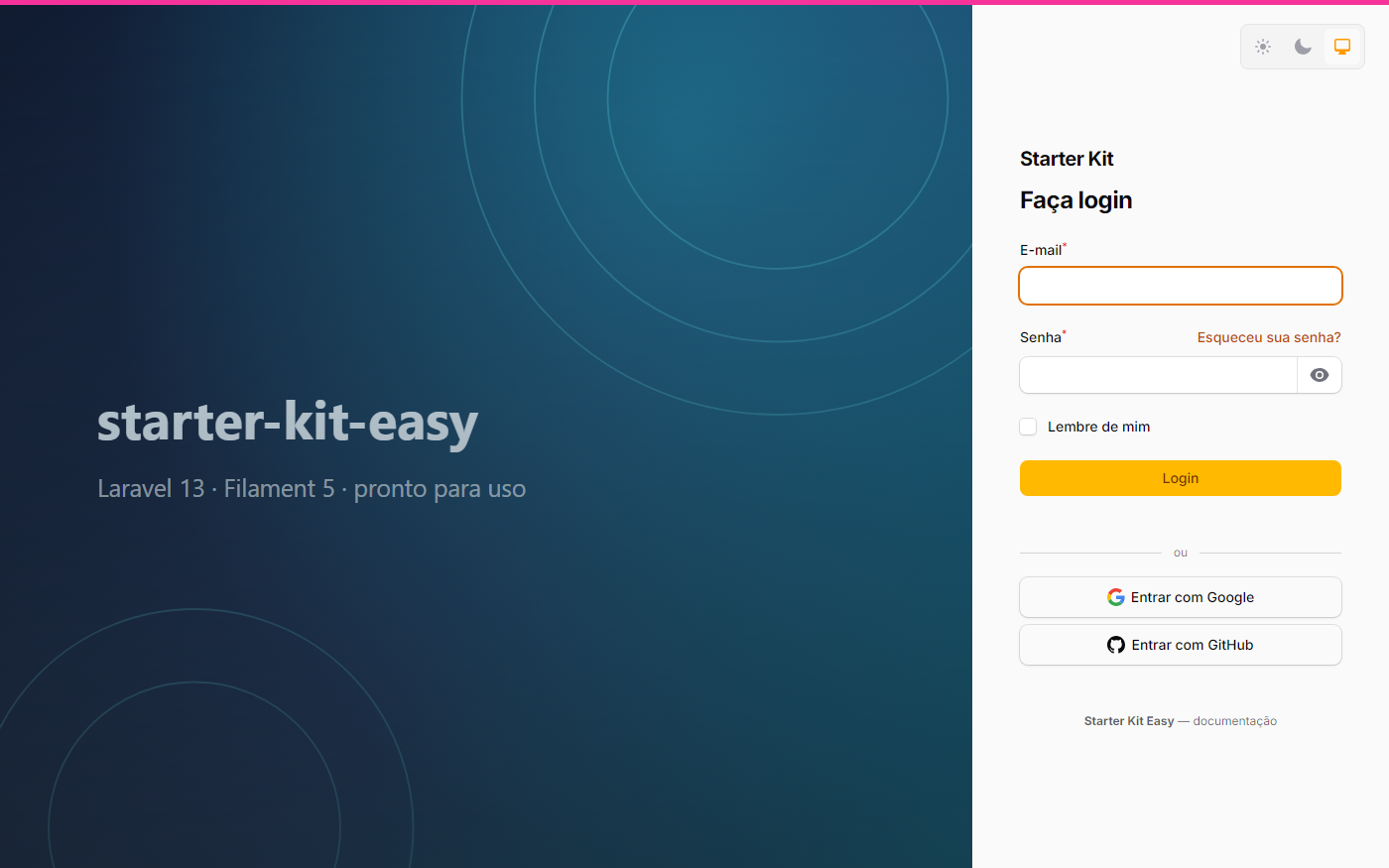 | 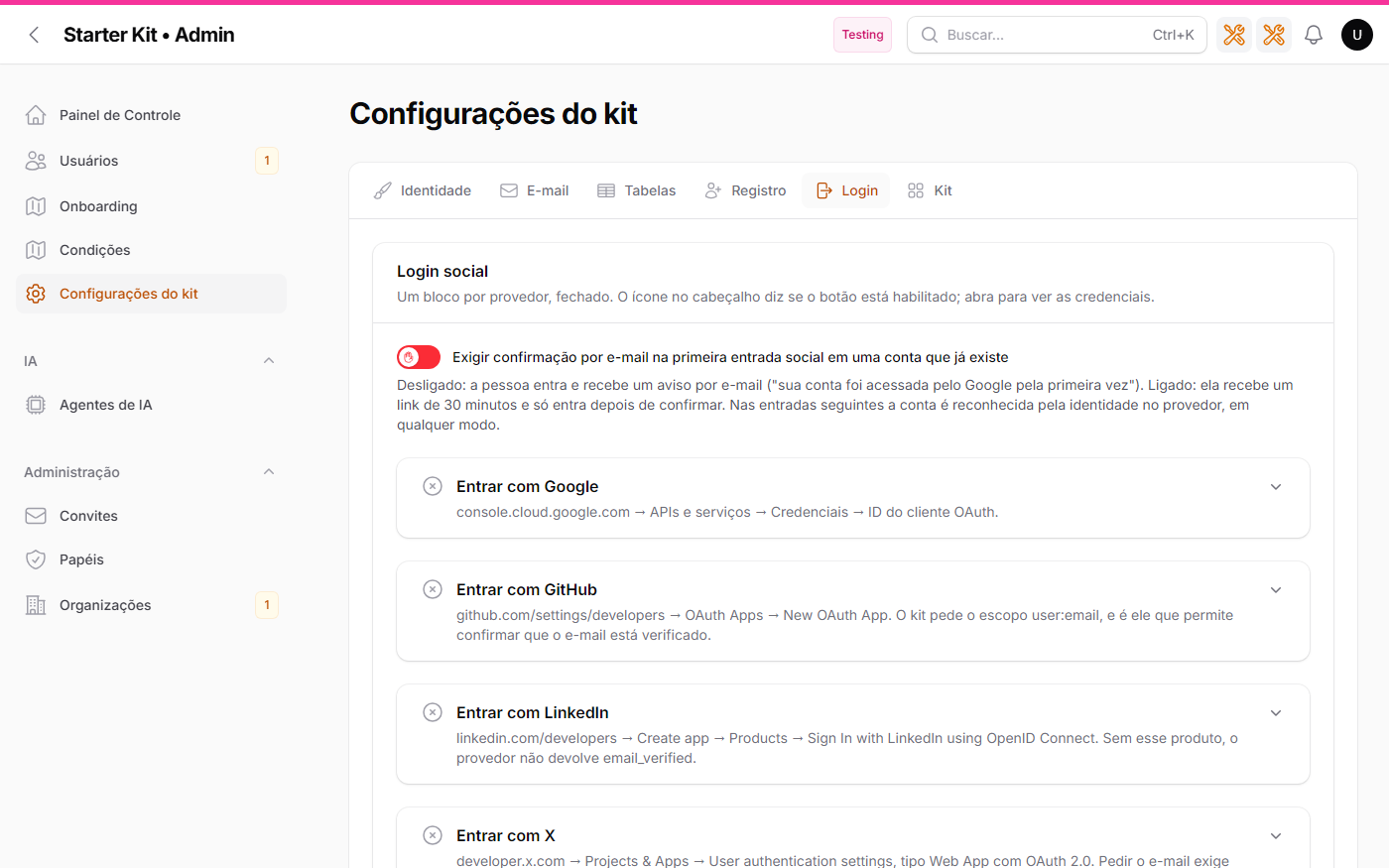 |
| The login screen with Sign in with Google and Sign in with GitHub, and the Markdown footer | /admin/configuracoes-do-kit → Login: one collapsed block per provider with the status icon, the linking switch and the footer |
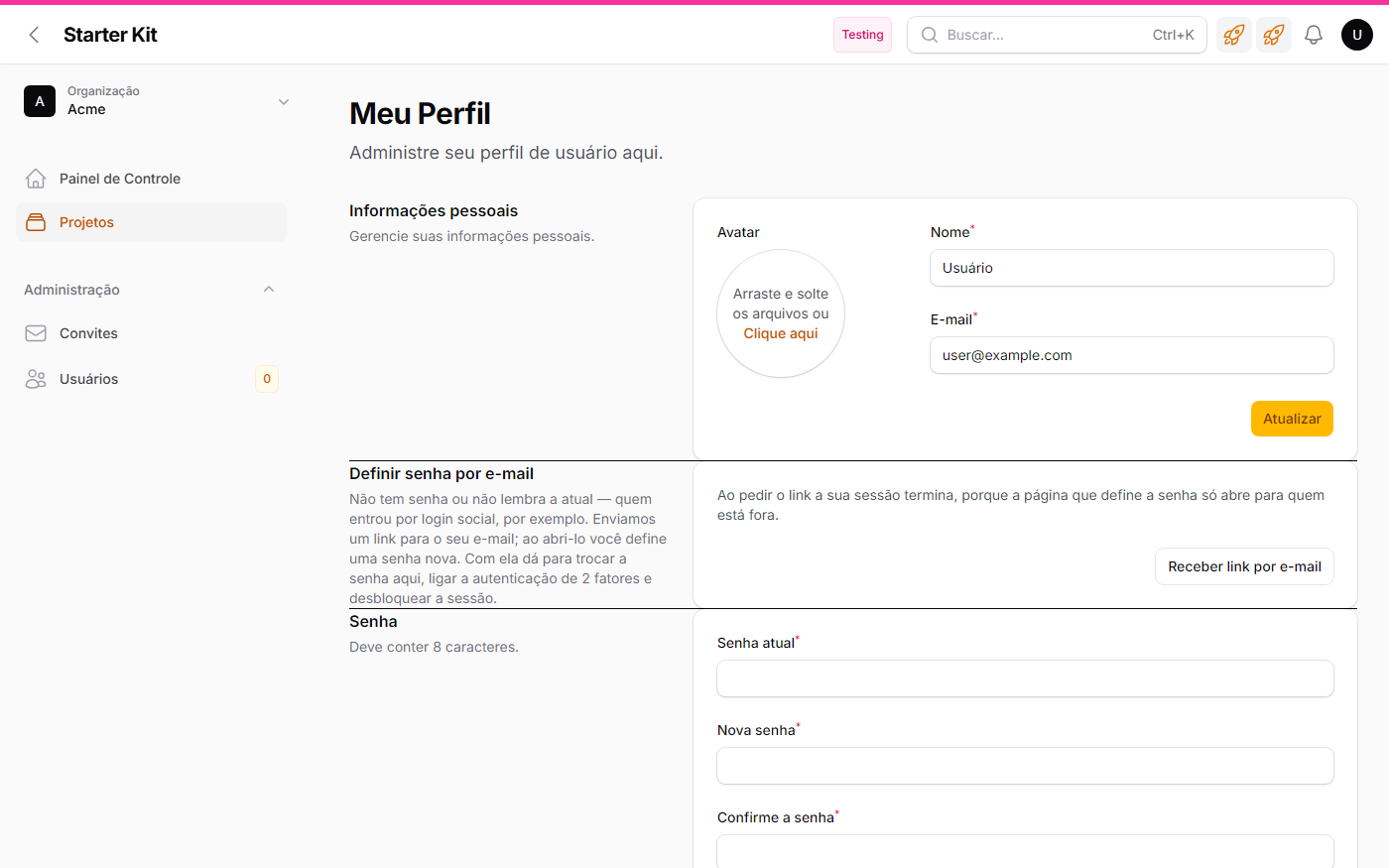 | 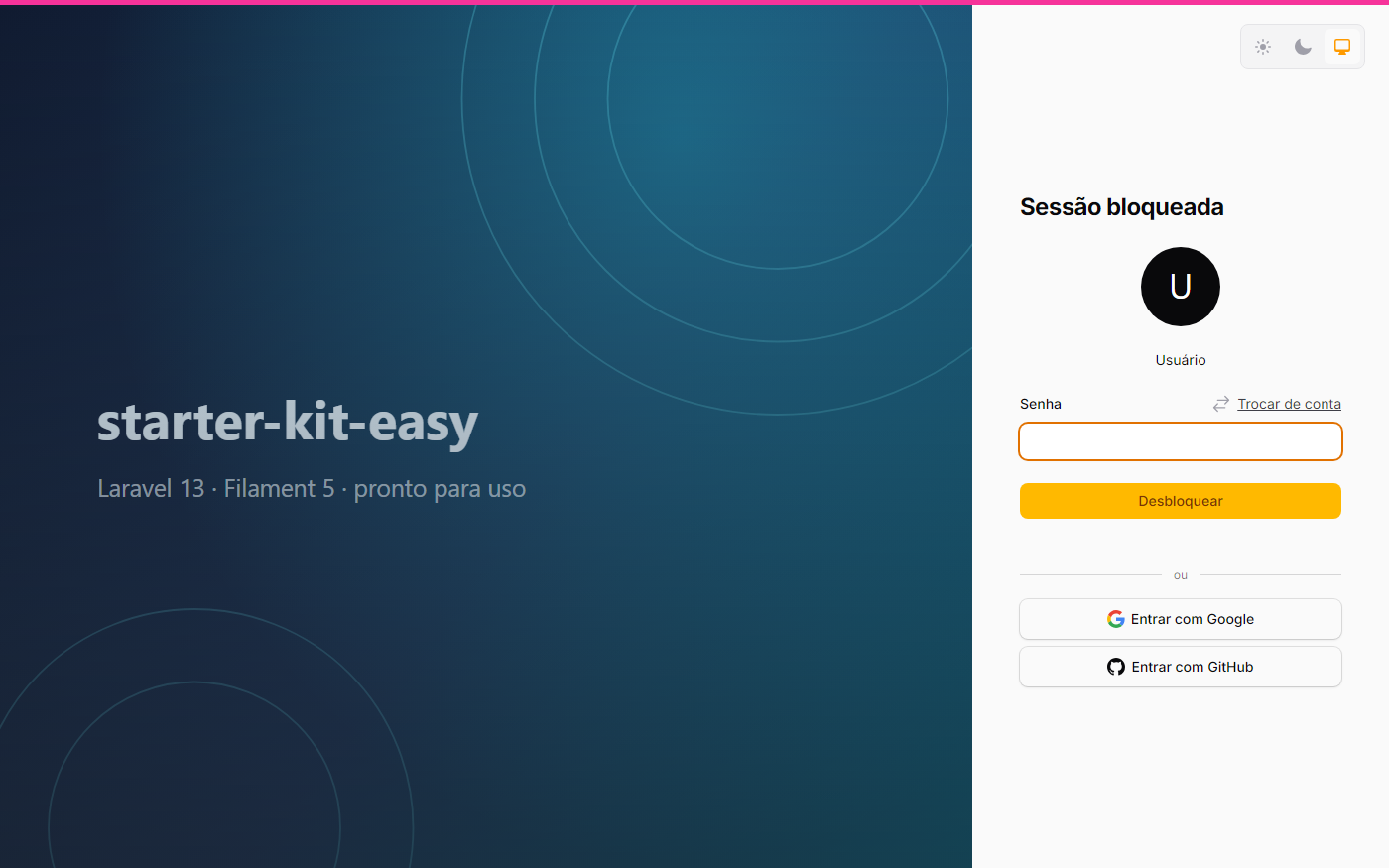 |
| The profile: Set a password by e-mail above “Password” — whoever came through a provider has no current password | The session lock screen offers the same buttons; coming back from the provider unlocks it |
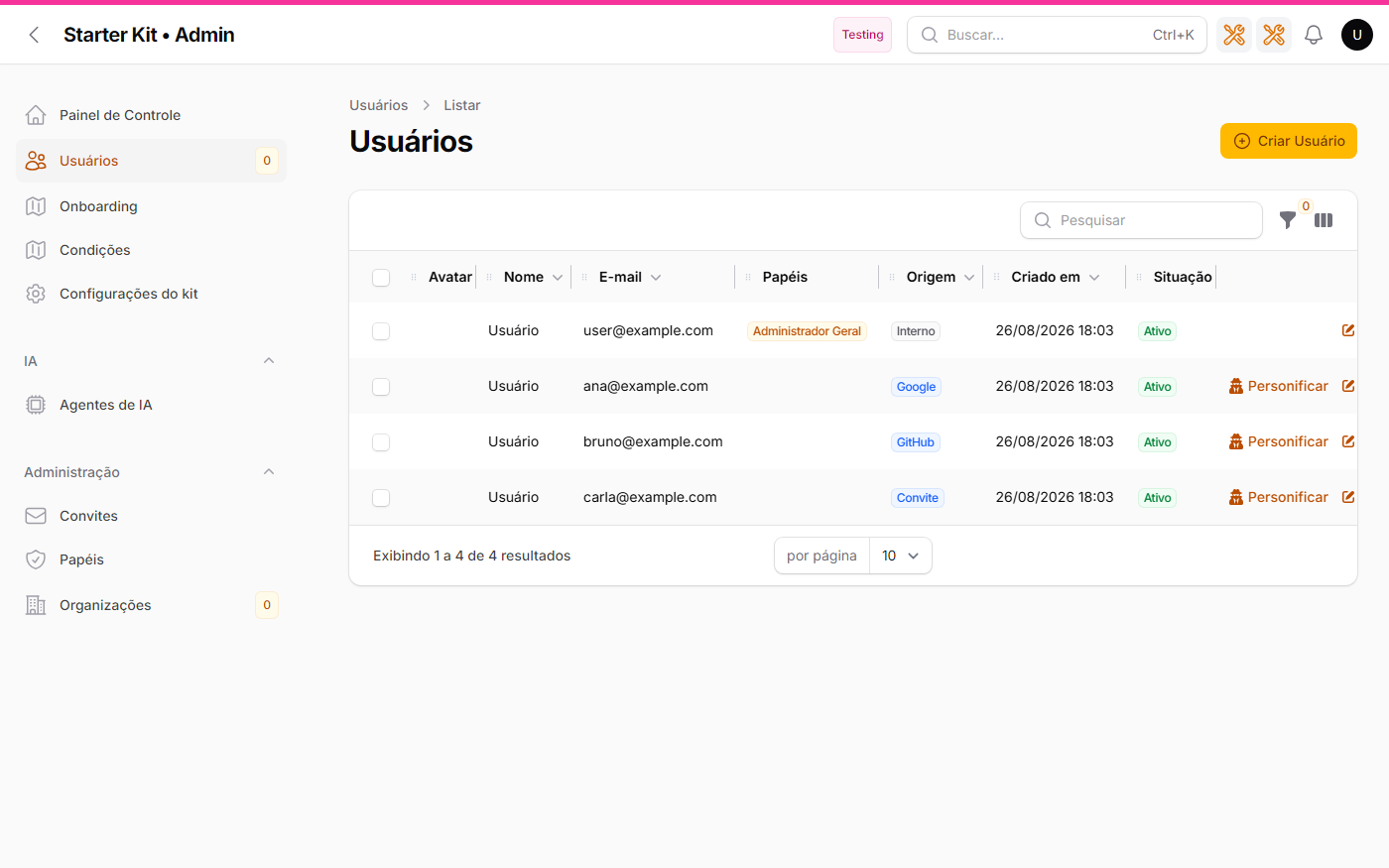 | |
/admin/users: the Origin column says which door each account came through (Google, GitHub, Invite, Open registration, Internal) |
Linking to the provider: the first time, and the next ones
The question that motivated this section: “could I create a Google account with someone else’s e-mail and get into their account?” No — and it is worth understanding why before reading what the kit does on top of that.
The kit only accepts an e-mail the provider declares verified (table above). Google, GitHub, LinkedIn and X only mark an e-mail as verified after sending a code or a link to that mailbox. So whoever gets a “verified” identity with somebody else’s e-mail already controls that person’s mailbox — and whoever controls the mailbox already gets in through the kit’s own “Forgot your password?”. Social login does not open a door that did not exist: it accepts the same proof. It is the model Auth0 calls trusted providers.
Two residual risks remain, and they are what the link addresses: a recycled address at the e-mail provider (the new owner verifies the address at Google and would reach the previous owner’s account — but would also reset that password), and a bug or compromise of the OAuth provider.
The link. Every social login stores, in the vinculos_sociais table, the person’s identity at the provider — the sub, the account id over there, stable even when the e-mail changes — next to the kit account. No token: it is recognition, not a credential. From the second login on the account is recognised by the link, before looking at the e-mail: an e-mail change at the provider, or a recycled address, does not lead to another account.
The first time. When a provider shows up for the first time on an account that already existed, what happens depends on a switch — KIT_SOCIALITE_VINCULO_CONFIRMAR in .env, or the /admin/configuracoes-do-kit → Login → “Require e-mail confirmation…” screen:
Default mode (false) | Strict mode (true) | |
|---|---|---|
| Account exists, first time for this provider | links, logs in, and sends the e-mail “your account was accessed through Google for the first time — wasn’t you? change your password and tell the administrator” | does not log in; sends the e-mail “confirm signing in through Google” with a signed 30-minute link; opening it creates the link and starts the session |
| Account exists, already linked | logs in through the link, no e-mail | same |
| Account does not exist, open registration on | creates through the open-registration door and is born linked — there is no previous account to protect | same |
| Account does not exist, registration closed | refuses (“access is by invitation”) | same |
The default-mode e-mail is detection: it makes the residual risk visible to the person themselves. Strict mode is prevention: it demands the proof (the mailbox) at the exact moment it matters. The confirmation link is valid only for that account and that identity, is signed, expires, and if the identity already belongs to another account the confirmation refuses — a provider identity belongs to one account only.
Both e-mails go through the queue (
ShouldQueue, like the invitation). Without a worker running nothing goes out —composer devstarts one. On the real-install validation that was the first stumble: the “link sent” notice showed up, and the e-mail sat in thejobstable untilqueue:work.
Signing up through the provider, from the registration screen. /app/register shows the same buttons (with open registration on), and the click carries the screen’s context until OAuth comes back: with multi-tenancy, /app/register?org=acme creates the account in acme, with the open-registration role there — the same door as the form, with the same refusals (unknown or closed organisation). From an invitation link (?token=), signing in through the provider accepts the invitation: the account is born with (or the existing one gains) the invitation’s organisation and role, and the invitation is consumed — as long as the provider’s verified e-mail is the invited one; if it is another, it refuses and the invitation stays intact. No password in any case: the provider proved the e-mail. A new account without ?org= under multi-tenancy is still refused.
An existing account logs in normally in any mode, but does not consume an invitation through this path: ?token= travels on a public GET route with no CSRF, and with the provider’s silent SSO the acceptance would happen without the person clicking anything. Someone who already has an account accepts the invitation on the authenticated Invitations received screen, which requires the owner and asks for confirmation. Audit and decision in wikis/specs/feat/travas-de-escalada-de-papeis/ (F-03 and F-04). Decisions and cases: wikis/specs/feat/cadastro-social-por-convite-e-organizacao/.
Decisions and cases: wikis/specs/feat/vinculo-de-provedor-social/.
The button only shows with EVERYTHING filled in — per provider
There are two conditions, in conjunction, and they fail for different reasons:
- that provider’s switch on — off is a choice made by whoever installed;
- its
client_id,client_secretandredirectall filled in — an empty credential is an oversight by whoever configured.
A switch on with an empty client_secret keeps the button off the air, on purpose: a button leading to a non-existent OAuth is a promise the screen cannot keep.
And turning it off takes the ROUTE down, not just the button. With a provider unavailable, /auth/{provider}/redirect and /auth/{provider}/callback answer 404 — only that provider’s, the others stay up. Hiding the button would be no barrier at all: the URL is fixed, public and well known.
A provider outside the list answers 404 without even reaching the controller. /auth/facebook/callback, /auth/discord/callback or any other segment return 404 because the route parameter is typed as App\Support\ProvedorSocial — the allow-list is the enum, and the router consults it.
Each switch also fails closed: false, 0, off, no, empty and any unrecognizable value keep it off. Only true and 1 turn it on.
The login screen footer
The same configuration brings a Markdown footer (bold, italic, link; raw HTML is discarded) to the bottom of the login screen on all three panels:
KIT_LOGIN_RODAPE="Acme · All rights reserved"
Empty (or whitespace only) = no footer, no empty strip.
It is text, not HTML, and the value is escaped on output. The login screen is public and unauthenticated: raw HTML coming from an editable field there would be stored XSS with the worst possible reach — the screen everyone comes through. If you need a link in the footer, the answer is a structured field (text + URL, validated), not a free-form HTML field.
Unverified e-mail: why we refuse, and how each provider proves it
The link to the kit account is made by e-mail, compared case-insensitively and trimmed. That is simple and costs no new column — but it carries a known risk: if the provider returned an unverified e-mail, creating an account at that provider with somebody else’s address would be enough to get into their account. With the kit’s registration closed — the default — that is precisely the main path, not an edge case.
So the kit requires positive proof from every provider. Absent, false, or anything that is not clearly true ⇒ refusal, with a notice on screen and the email_nao_verificado reason in the log. Fails closed, always.
What changes from provider to provider is where the proof lives, and the difference is large:
- Google — reports
email_verifiedin the payload (plus averified_emailalias). The kit reads it and requires true. - LinkedIn — the OpenID Connect userinfo carries
email_verified. That is why the kit uses thelinkedin-openiddriver and not the legacylinkedin: the legacy one reports no verification at all, and its scopes were deprecated by LinkedIn itself. - X — has no verification field, because it does not need one: X only ever returns
confirmed_email, that is, an address it has already confirmed. The presence of the e-mail is the proof. If X returns no e-mail (an app without theusers.emailscope, or an account with no confirmed address), the kit refuses with theemail_ausentereason. -
GitHub — presence as well, by a route worth understanding before you touch the scopes. Socialite queries
/user/emails, picks the entry that isprimaryandverified, and overwrites the e-mail with it — or with nothing, if the query fails or no entry matches. There is no verification field in the payload, and none is needed: a filled e-mail already meansprimary+verified, and an empty one falls into theemail_ausenterefusal.This rests on one condition: the
user:emailscope. It is the driver’s default, and thescopeskey inconfig/services.phpmerges with the defaults rather than replacing them, so adding scopes is safe. What would break the guarantee is asetScopes()in the kit’s code droppinguser:email— GitHub would then hand over the public profile e-mail, unverified, silently. There is a test guarding exactly that; do not turn that scope off.Earlier versions of this section said the kit re-ran the
/user/emailsquery itself. It did, and it was redundant: the reading of Socialite’s code that justified the call was wrong. The call was removed — the kit calls no provider API at all.
One consequence to know, for all of them: if the person changes the e-mail on the provider account, the link is lost and they go back to signing in with a password.
Known limitation: the destination is always the /app panel
The buttons appear on the login screens of all three panels, because the render hook is a single one. But anyone arriving through social login lands on /app, even having clicked on /admin/login or /infra/login — and a refusal also returns to the /app login.
This is not a security hole: the person is authenticated and their role still governs what they can reach. It is navigation friction, recorded as an accepted limitation because carrying the origin panel across the OAuth round trip is a new feature, not a fix to this one. Administrators and infra operators normally sign in with a password; social login exists for the /app path.
Facebook and Discord: why they are not here
The original requirement asked for both. Neither made it, each for a different reason.
Facebook — there is no way to confirm the e-mail. Socialite has the driver, and it works; what does not exist is a field asserting that that address was confirmed. The verified field the provider requests is account level, legacy, and absent from the Graph API version it uses; the OIDC/Limited Login path returns claims without email_verified. Accepting Facebook would make the assurance level of your login depend on which button the person clicked — and the weakest button would be the vector. If you knowingly accept that risk, what is missing is: a case in App\Support\ProvedorSocial whose verification branch states the assumption, the block in config/services.php (key facebook) and in config/kit.php, and the three Settings properties. Read ADR-05 first — it lists the alternatives that were considered and why each is worse.
Discord — it is not a Socialite driver. The official documentation supports Facebook, X, LinkedIn, Google, GitHub, GitLab, Bitbucket and Slack; everything else comes from the community catalogue at socialiteproviders.com. Including it requires composer require socialiteproviders/discord and registering a SocialiteWasCalled listener — a new dependency and a second extension mechanism. The kit does not add dependencies on its own; if you want it, that is the path, plus a case in the enum (Discord does expose a verified field in the payload, so the barrier has something to stand on).
Where the records go
Everything goes to the autenticacao channel (storage/logs/autenticacao-*.log), in the same format as the rest of the kit — [Class@method] message | key: value, with the e-mail masked, the provedor on every line and a readable motivo on each refusal:
motivo | What happened |
|---|---|
falha_no_provedor | invalid CSRF state, network down, or credential rejected by the provider |
email_ausente | the provider returned no e-mail (on X, this is the missing-scope case) |
email_nao_verificado | the e-mail is not verified at the provider |
conta_inexistente_registro_fechado | there is no account and open registration is off |
conta_criada_por_login_social | a new account was created (open registration on) |
No client_secret ever appears — not in a log, not on screen, not in an error message, and not in the HTML of the configuration screen. And the messages returned to the visitor are deliberately generic: telling which barrier refused hands reconnaissance information to anyone probing. The reason stays in the log, for you.
Social login also lands in the /infra panel’s access trail (who signed in, when, from where), like any other login — with no configuration at all.
The Google secret was stored in cleartext in the audit trail up to v0.19.3
If you configured GOOGLE_CLIENT_SECRET through the /admin/configuracoes-do-kit screen on any version between 0.19.2 and 0.19.3, rotate that secret in the Google console.
Why: the audit trail’s secret mask decides what to hide by consulting the ConfiguracoesDoKit::encrypted() list, and the Google client_secret was not on that list. So every save through the screen wrote the value in cleartext into the old_values/new_values columns of the audits table — and the audit screen displays those columns for reading.
What this version does for you:
- fixes the list, which closes the leak going forward for all four provider secrets and the SMTP password at once (one list, three consumers: the read decryptor, the write encryptor and the trail’s mask);
- masks what is already stored, in a migration that replaces the value with the same mask the trail uses today. The trail row is preserved — who changed it, when and from where stays on record; only the value that should never have been there goes;
- warns in the log (
configuracoeschannel) how many rows were masked, with the instruction to rotate.
Masking the trail does not undo the fact that the value was readable. That is why the rotation is yours, and it is the one step the kit cannot take for you.
Adding the next provider
The kit does have a provider abstraction now, and it is an enum: App\Support\ProvedorSocial. The decision was made with four cases in hand, not one — which revealed that the axis worth abstracting was not the redirect nor the button (identical across all of them), but the e-mail verification (radically different in each).
The recipe for a fifth provider, deliberately short:
- a new case in the enum, with
value= the Socialite driver name (that same value is the URL segment and the key in both config files), plus therotulo(),icone()andemailVerificado()branches; - a block in
config/services.phpand one inconfig/kit.php→login, and the keys in.env.example; - three properties in
App\Settings\ConfiguracoesDoKit, a line each inmapaDeConfiguracao(), theclient_secretinencrypted(), and theadd/addEncryptedpair in a new migration underdatabase/settings/; - an SVG partial in
resources/views/filament/auth/icones/.
No logic file changes: the routes, the controller, the buttons blade and the Login tab of the Settings screen all iterate ProvedorSocial::cases(). And the exhaustive match in emailVerificado() demands the new branch — forgetting it does not pass static analysis.
If the provider does not allow confirming e-mail verification, that is an architecture decision, not a ?? true. It is what took Facebook off the list. Record the choice before writing the branch.
The full reasoning, with the rejected alternatives and the
vendor/file:linebehind every claim about Socialite, is inwikis/specs/feat/mais-provedores-sociais/mais-provedores-sociais/. The previous decision — not to abstract, with a single provider — is inwikis/specs/feat/login-social-google/login-social-google/, ADR-10.